
Voucher & PrintingTallyPrime add-onCode P015
Change E-Invoice QR Code Position
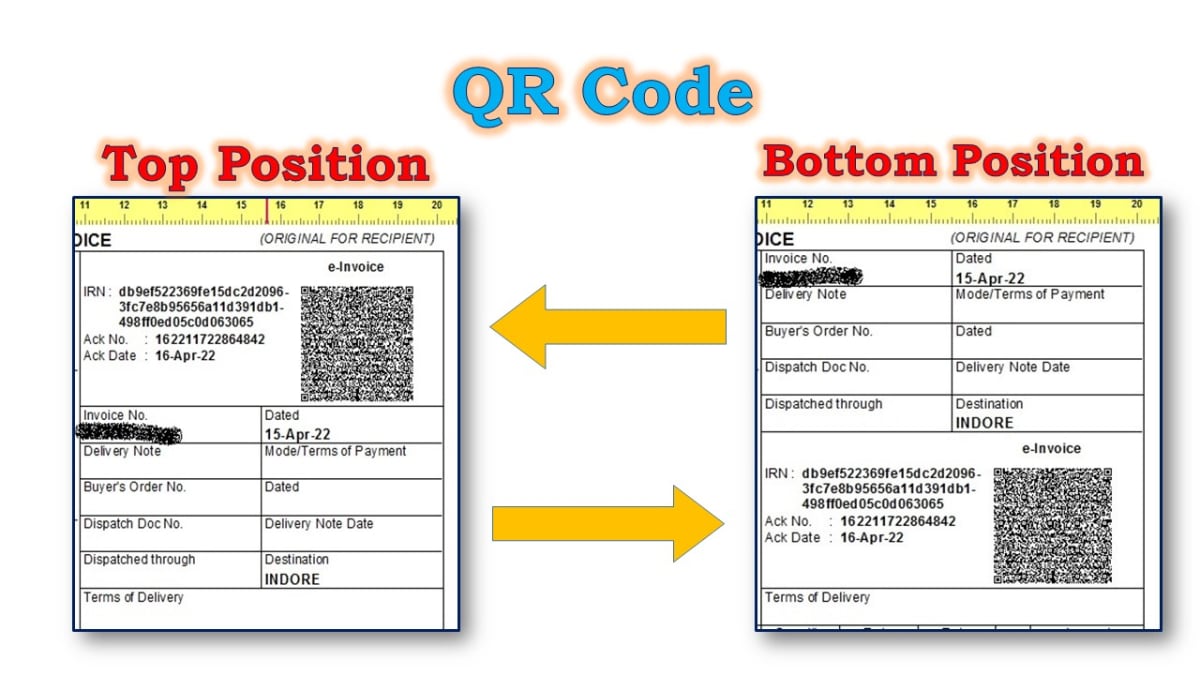
Using this add change E-Invoice QR Code print position in invoice.
What it does
- 1- Select print position in voucher type master.
- 2- Print E-Invoice QR Code Top / Bottom position.
FAQ
Change E-Invoice QR Code Position — FAQ
Does the Change E-Invoice QR Code Position add-on work with my TallyPrime?
The Change E-Invoice QR Code Position add-on is built in TDL for TallyPrime. Tell us your TallyPrime release and licence type and we will confirm before installation.
How is the Change E-Invoice QR Code Position add-on installed?
We install it on your TallyPrime online, or on-site in Surat, and show your team how to use it. Your existing data is not changed.
Can the add-on be changed for my business?
Yes. If you need a different format, extra columns or a small change in how it works, tell us and we will quote for the change.
Related add-ons
Need a small change that isn't listed?
Most add-ons start as a customer's request. Tell us yours.